TalentSync Pythia

Make Setup, Management, and Growth as Easy as a Conversation.

Pythia helps teams turn Talent Tree data, Profiles, Passport proof, workflow signals, and unanswered questions into guided conversations and reviewable next actions.

The data stays connected. The conversation changes with the question.

Home / TalentSync Product Details / Pythia in TalentSync

One Source of Intelligence. Infinite Conversations.

Instead of forcing leaders and team members to search through static dashboards, Pythia curates the questions, drafts, reminders, and review items most relevant to the work happening now.

A feed of conversations for every organizational moment.

The Pythia home screen works like a curated media feed: each tab organizes guided conversations for a different kind of user, workflow, or decision.

  • Team leaders see alignment, bottleneck, and trust-boundary prompts.
  • Individuals see private reflection, role clarity, and growth prompts.
  • Recruiters, profile owners, and admins see source-aware workflows.

Make setup and management conversational.

Pythia guides the path from a messy question to a concrete draft, source check, or human-reviewed next step.

Step 1

Start with the real question.

Ask about a team, role, applicant, profile, workflow, evidence gap, or setup decision

Step 2

Use TalentSync context.

Pythia reads visible Stories, Tree nodes, Profiles, Passport Pages, and workflow signals.

Step 3

Create a reviewable output.

The result becomes a Story draft, profile section, evidence request, summary, or follow-up.


Pythia feed examples

This should be the main accordion section on the website. Each panel pairs a short explanation with a screenshot from the app.

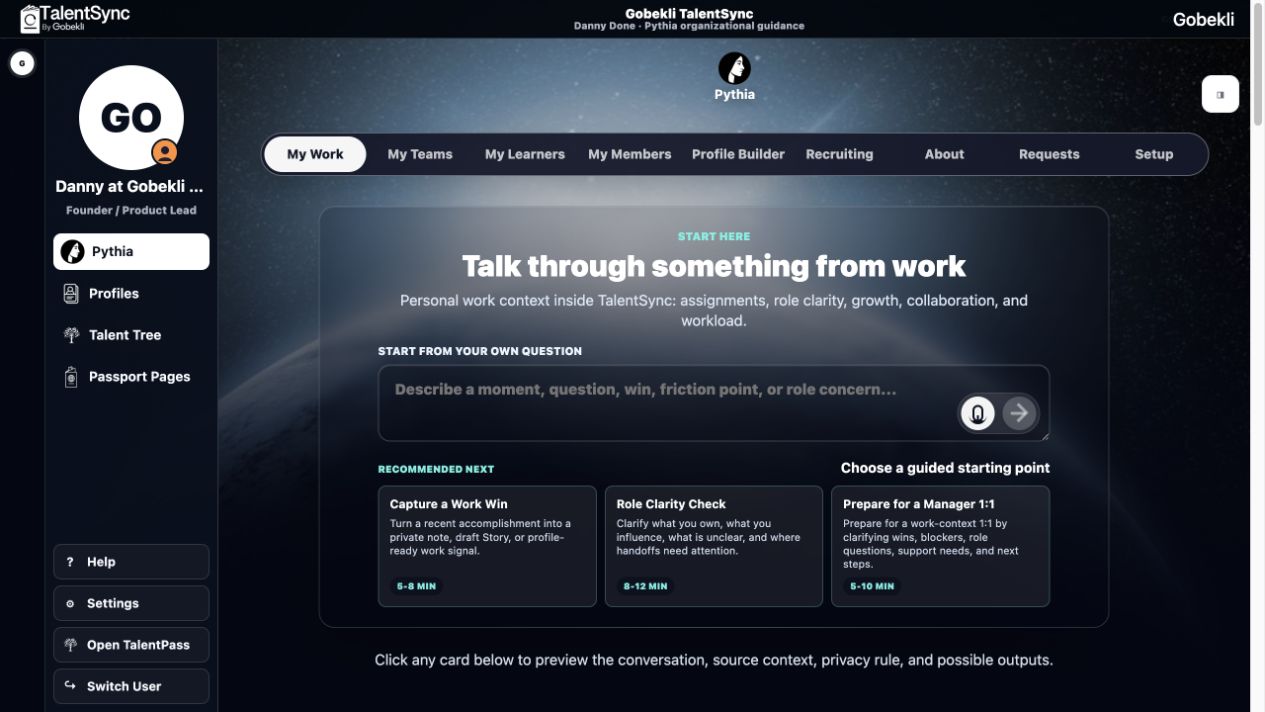
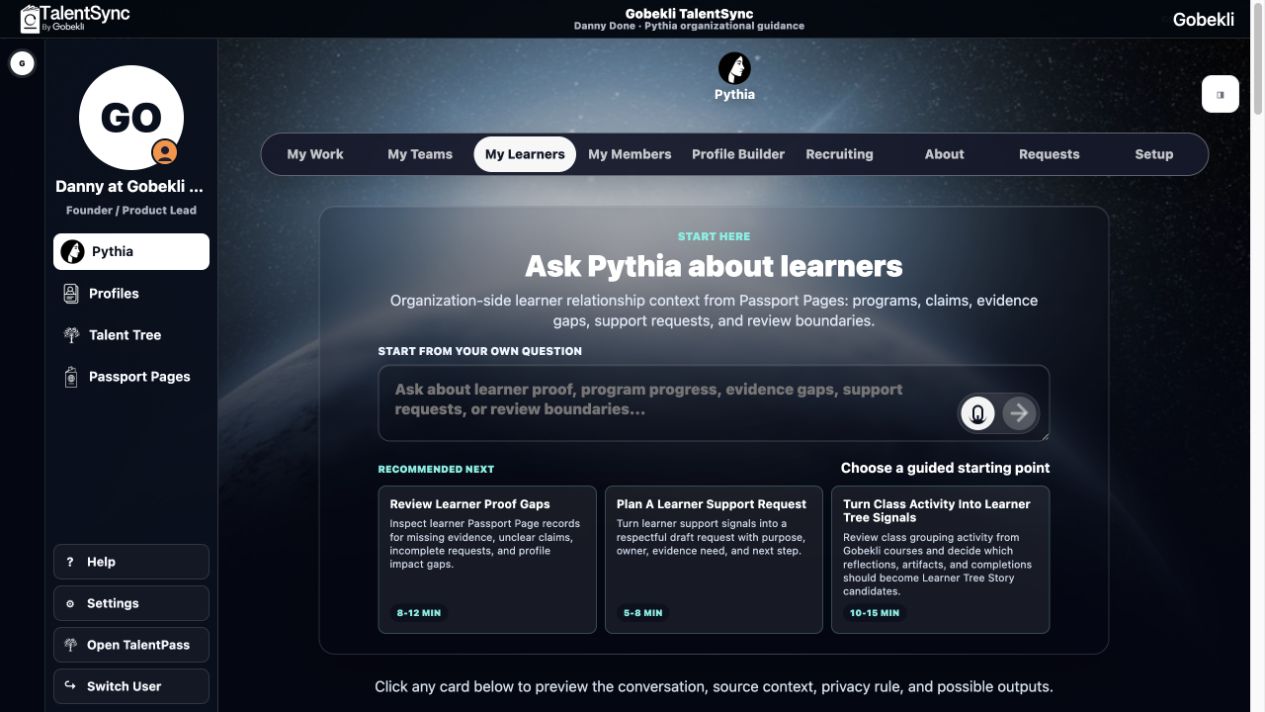
My Work - Investor profiles, Gallery Stories, readiness checks, source lineage, and missing Story slots.

Capture a Work Win
Helps a person turn a recent contribution into a draft Story with source context and optional visibility.
Role Clarity Check
Names what is formal, informal, unclear, or changing about the person’s work.
Prepare for a Manager 1:1
Creates a private prep note, then lets the person choose what becomes shareable.
Unpack a Blocker
Distinguishes a personal friction point from a workflow, role, evidence, or decision bottleneck.
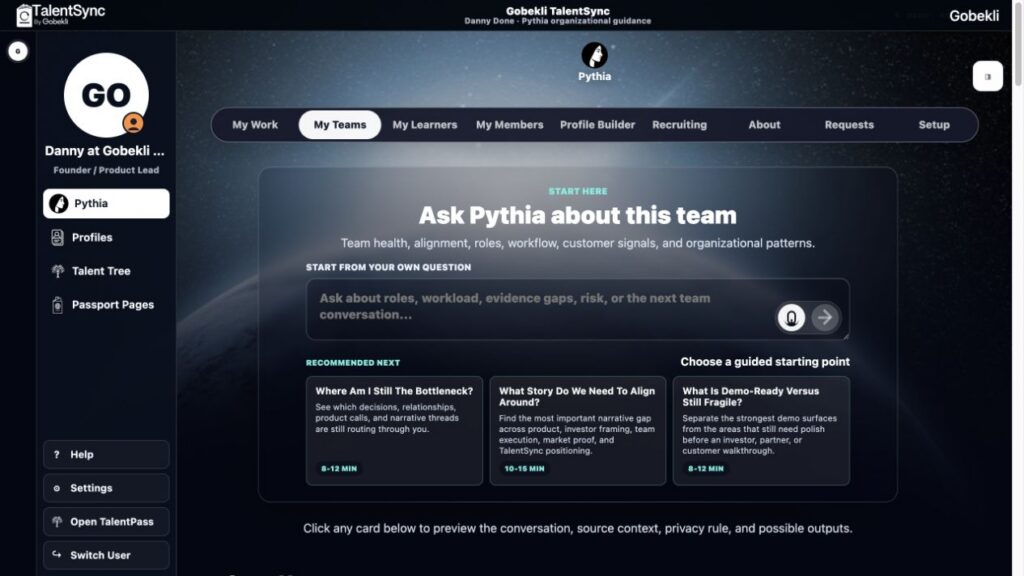
My Teams - Team health, alignment, bottlenecks, customer signals, trust boundaries, and manager follow-up.

Review Learner Proof Gaps
Finds incomplete program evidence and drafts the next review question without verifying credentials.
Plan a Learner Support Request
Turns visible progress and support signals into a consent-aware follow-up path.
Scan Member Affiliation Proof
Checks which membership claims, activities, or relationships need a Passport Page proof route.
Build a Membership Advisory Profile
Aggregates member Stories into a reviewable organizational view.
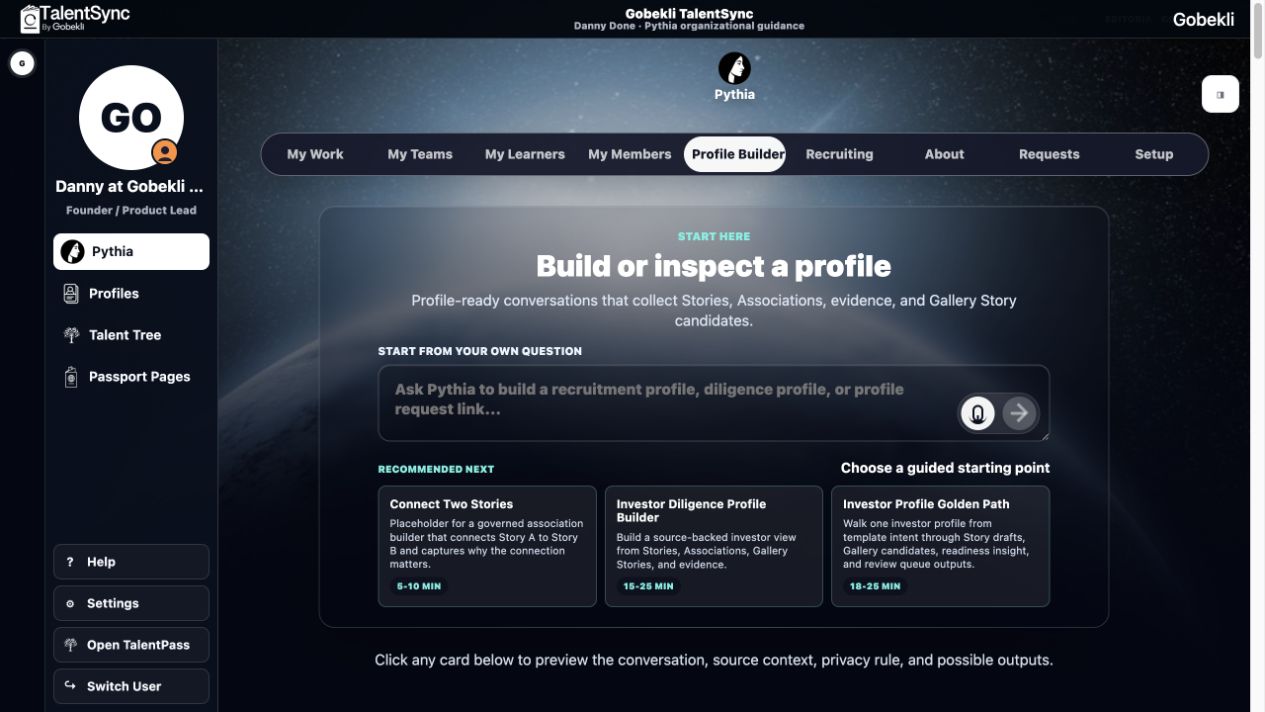
Profile Builder - Investor profiles, Gallery Stories, readiness checks, source lineage, and missing Story slots.


Investor Diligence Profile Builder
Builds an investor-ready view from Stories, Associations, Gallery Stories, and evidence posture.
Investor Profile Golden Path
Walks from profile intent through Story drafts, Gallery candidates, readiness insight, and review queue outputs.
Create Gallery Story From Source Stories
Turns multiple source Stories into a reviewable visual narrative candidate.
Profile Readiness Scan
Shows what is strong, inferred, missing, stale, or waiting on proof before sharing.
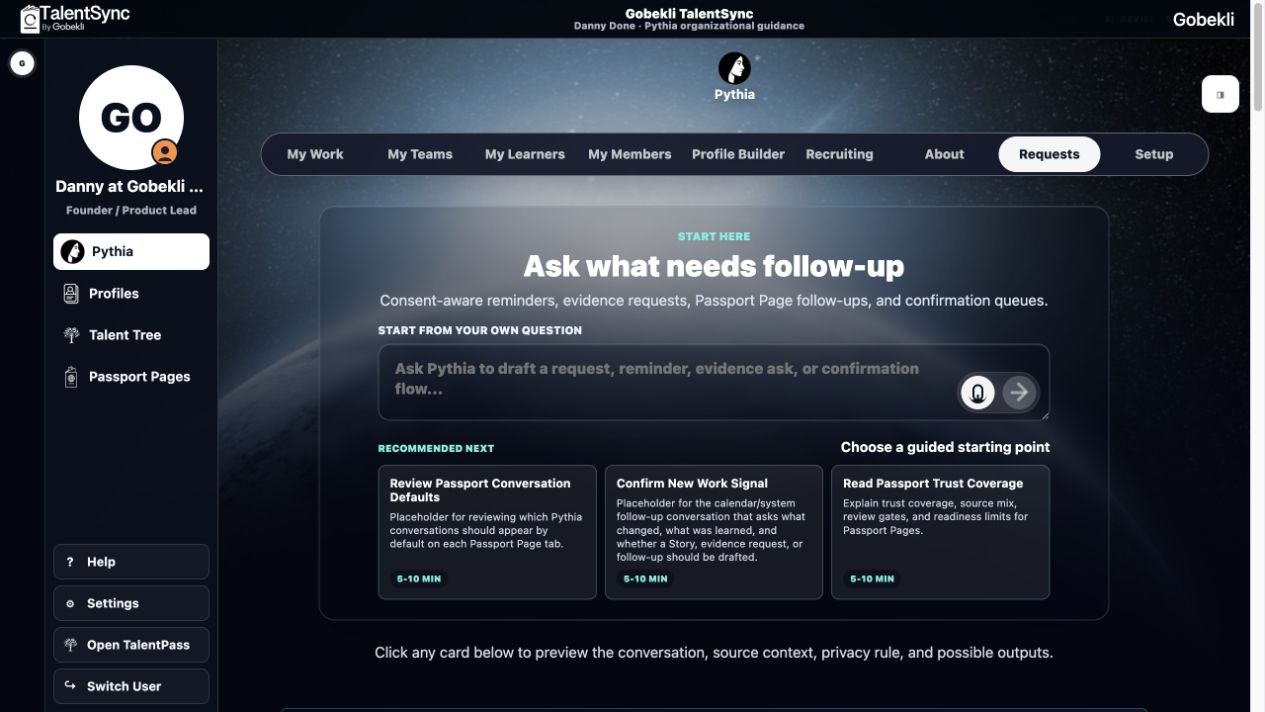
Requests - Evidence asks, confirmations, Passport Page follow-ups, reminders, and review queues.
Evidence Gap Follow-Up
Drafts a request for missing proof and keeps it unsent until purpose and recipient are reviewed.
Observed Progress Confirmation
Asks the right owner to confirm whether an observed signal should become a Story or profile contribution.
Create Passport Page Evidence Request
Prepares an external proof request tied to a Passport Page, Trust Record, or claim.
Manager Nudge Waiting
Surfaces a follow-up without exposing private person-owned context.
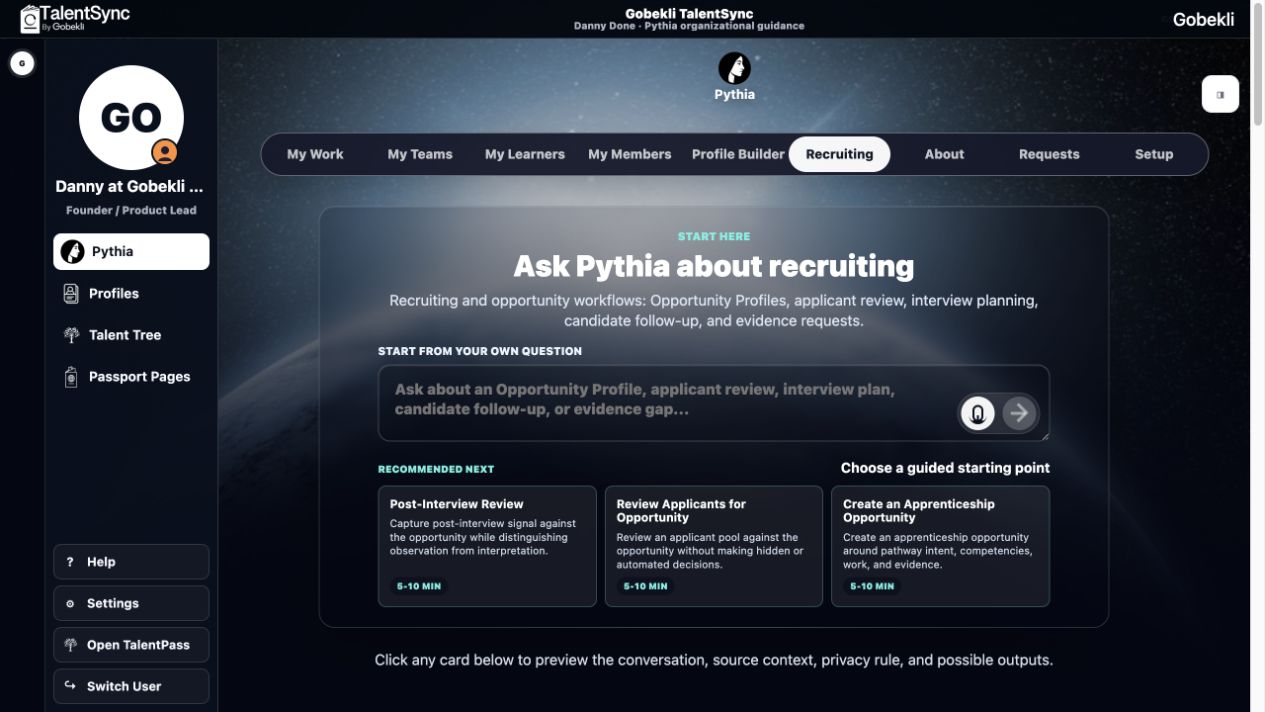
Recruiting - Opportunity Profiles, applicant review, interview planning, candidate follow-up, and Story Requests.
Create Your First Opportunity Profile
Turns role context into a public-facing Opportunity Profile and internal review structure.
Build a Job Listing
Converts responsibilities into Story Requests instead of keyword-only requirements.
Review Applicants
Compares returned Stories, evidence quality, gaps, and reviewer notes.
Post-Interview Review
Captures interview signal as a reviewable TalentSync record without making automated decisions.

Review Learner Proof Gaps
Finds incomplete program evidence and drafts the next review question without verifying credentials.
Plan a Learner Support Request
Turns visible progress and support signals into a consent-aware follow-up path.
Scan Member Affiliation Proof
Checks which membership claims, activities, or relationships need a Passport Page proof route.
Build a Membership Advisory Profile
Aggregates member Stories into a reviewable organizational view.
Setup and Orientation - New workspace setup, source boundaries, template education, and TalentSync product guidance.
Tell Pythia what this organization is
Creates draft organization context and initial Passport Page placeholders.
Choose systems and source boundaries
Names which systems contain reliable evidence and which data should stay excluded.
Build the first useful profile
Chooses a starter profile, audience, missing Stories, and setup tasks.
Welcome to TalentSync Beta
Explains the product, Tree, Profiles, Passport Pages, and review boundaries.

Behind every Pythia conversation is a governed template.

Pythia is not an open-ended chatbot dropped on top of organizational data. Admins and product teams define the conversation templates, context boundaries, output targets, review rules, and safety rails that determine what each conversation can do.

Templates

Conversation templates define the job.
Each template can specify the audience, purpose, allowed context, opening question, suggested prompts, expected outputs, and review state. A recruiting conversation, a profile-builder conversation, and a private work reflection are not using the same rules.

Segmentation

Context stays scoped to the user and purpose.
Pythia reads only the visible TalentSync context for that scenario: Stories, Profiles, Passport Pages, evidence, workflow signals, and settings allowed for the current role. Person-controlled or private context stays out unless consent and visibility rules allow it.

Safety

Outputs are staged before they become real.
Pythia can draft, summarize, explain, and recommend. It cannot verify claims, grant access, expose private data, issue credentials, or send requests on its own. Outputs move through review queues and owner confirmation.

1

Choose the conversation type.

Examples: profile builder, evidence request, manager nudge, applicant review, private reflection.

2

Set allowed context.

Limit the template to visible Stories, selected Profiles, Passport proof, workflow data, or setup answers.

3

Define outputs.

Specify whether Pythia drafts a Story, request, profile section, summary, review note, or next action.

4

Route to review.

Send drafts to the right owner before they become shareable, durable, or externally visible.

Pythia proposes. People confirm.

Evidence remains the source of truth.

The page needs this boundary so Pythia feels powerful without sounding like unbounded automation.

Draft

Pythia can draft and explain.

It prepares Story drafts, summaries, profile sections, evidence requests, and review notes.

Review

Outputs go to people.

Managers, profile owners, evidence owners, or admins decide what becomes visible or durable.

Trust

Proof still matters.

Pythia does not verify claims, grant access, expose private context, or send requests by itself.

Pythia keeps the TalentSync loop alive.

Stories, the Talent Tree, Profiles, Passport Pages, and review queues become more useful when people can talk to the system and understand what should happen next.

01

Stories

People and systems contribute source context.

02

Talent Tree

Stories become organized meaning.

03

Profiles

Source-backed views answer specific questions.

04

Pythia

Conversation turns context into drafts and next actions.

05

Review

People confirm what becomes real.

Explore TalentSync Features

Give every team member a better way to understand what matters now.

Pythia helps organizations use TalentSync as a living system of questions, evidence, growth, trust, and action.