



EMPLOYER USE CASE · AN ILLUSTRATED SCENARIO
A 14-person maintenance team has work orders, training records, and an org chart. Yet difficult problems still return to the same few people, and important context gets lost between shifts.
Meet Atlas Industrial Systems. This fictional scenario explores how TalentSync could help its team understand its capabilities, improve handoffs, and prepare for changing work. Illustrations show product concepts and example data, not a deployed customer implementation. Current product availability.
Atlas keeps production equipment running across multiple shifts. The records show assignments and completed work. They say less about why an issue keeps returning, who knows the exception, or what the next shift needs to understand.
The team’s challenge is to bring those perspectives together before adding more work or another tool.
01 · ESTABLISH THE SHARED PICTURE
The manager starts with the team’s mission: keep equipment safe, reliable, and available. Employees add the responsibilities, relationships, and exceptions that formal records miss.
The Team Profile puts mission, role coverage, responsibilities, and current priorities in one view.
Pythia could guide the conversation: What do you handle that is not in your job description? When do people turn to you? Which responsibilities are unclear?
Those answers add human context to the organizational records. Profiles focus the shared picture around the team’s purpose.
02 · LOOK BEYOND THE ASSIGNMENTS
Now Atlas can ask where capability is being used, where relevant experience is underused, and what the available evidence does not yet establish.
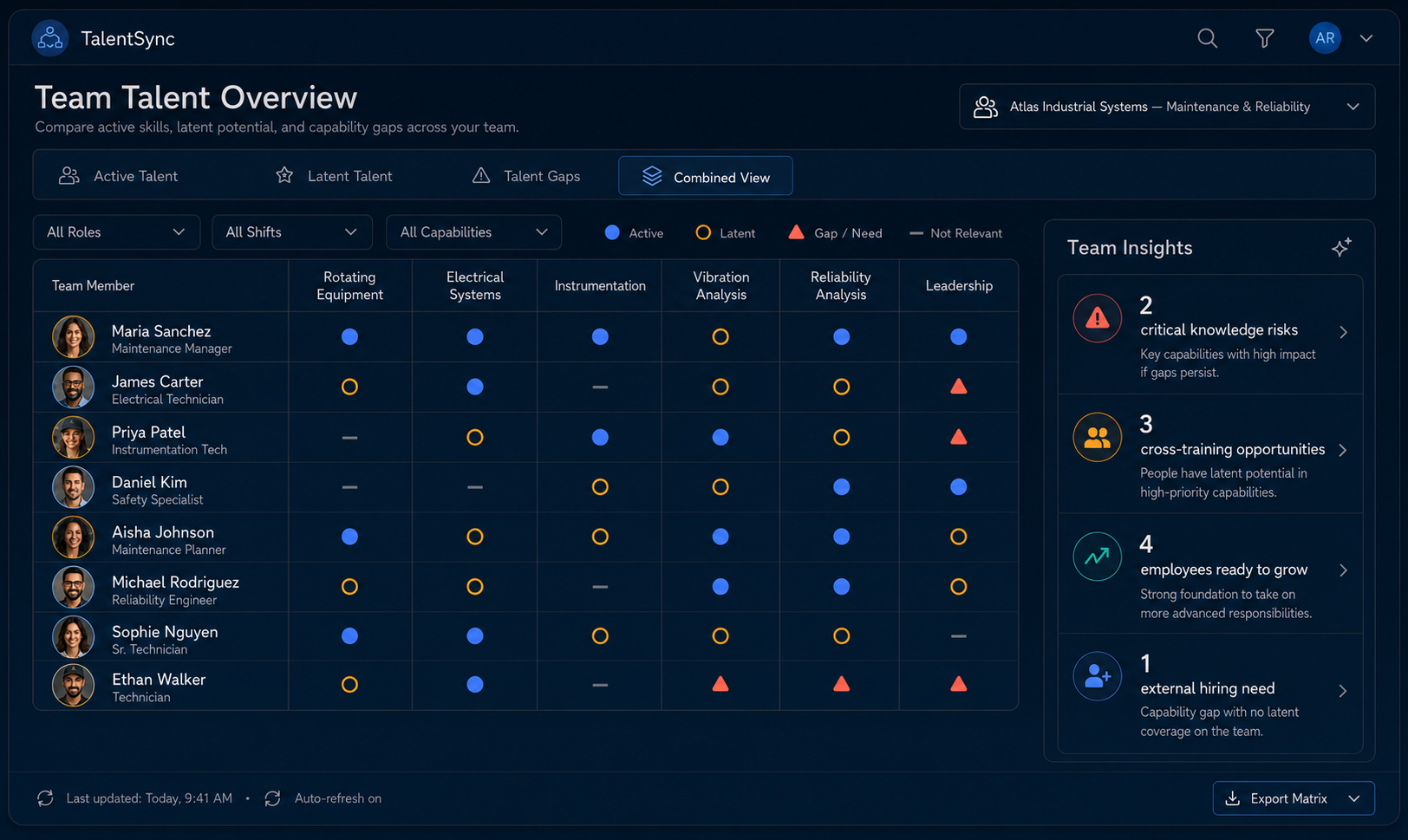
The example compares active talent, latent experience, and gaps. Its indicators are prompts for review, not automatic staffing decisions.
Experience demonstrated through current work.
Relevant strengths that current assignments may leave unused.
Missing capability, unclear support, or evidence that needs checking.
Suppose the discussion reveals that recurring equipment problems depend heavily on one experienced technician. Colleagues may have adjacent experience, but need practice, access, or guidance before taking on more.
The Talent Tree connects those possibilities with their supporting context. The next step is to investigate—not assume that every gap requires a new hire.
03 · FOLLOW THE HANDOFF
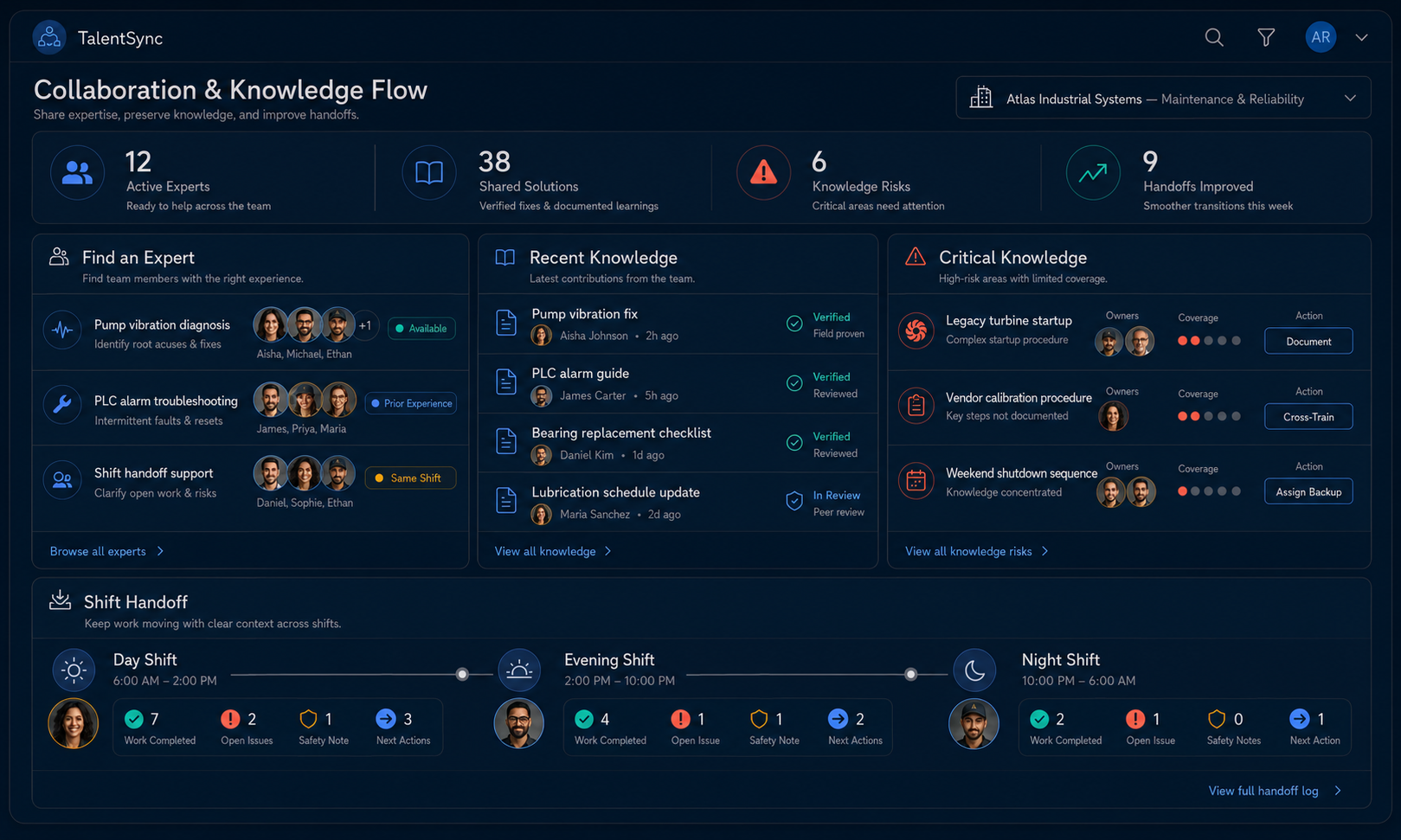
Atlas follows a recurring issue from detection through assessment, assignment, and the next shift. The question changes from “Who has the skill?” to “What must each person know to carry the work forward?”
This concept brings people, knowledge, and shift handoffs into the same conversation.
Shows the people, responsibilities, and capabilities the group can draw on.
Follows activities, decisions, dependencies, and handoffs—even when they cross teams or shifts.
For this example, the team could agree who owns the next decision, what context travels with the issue, and where a reviewed explanation should be maintained. Supported practice could help a second person build relevant experience.
04 · ADAPT AS THE WORK CHANGES
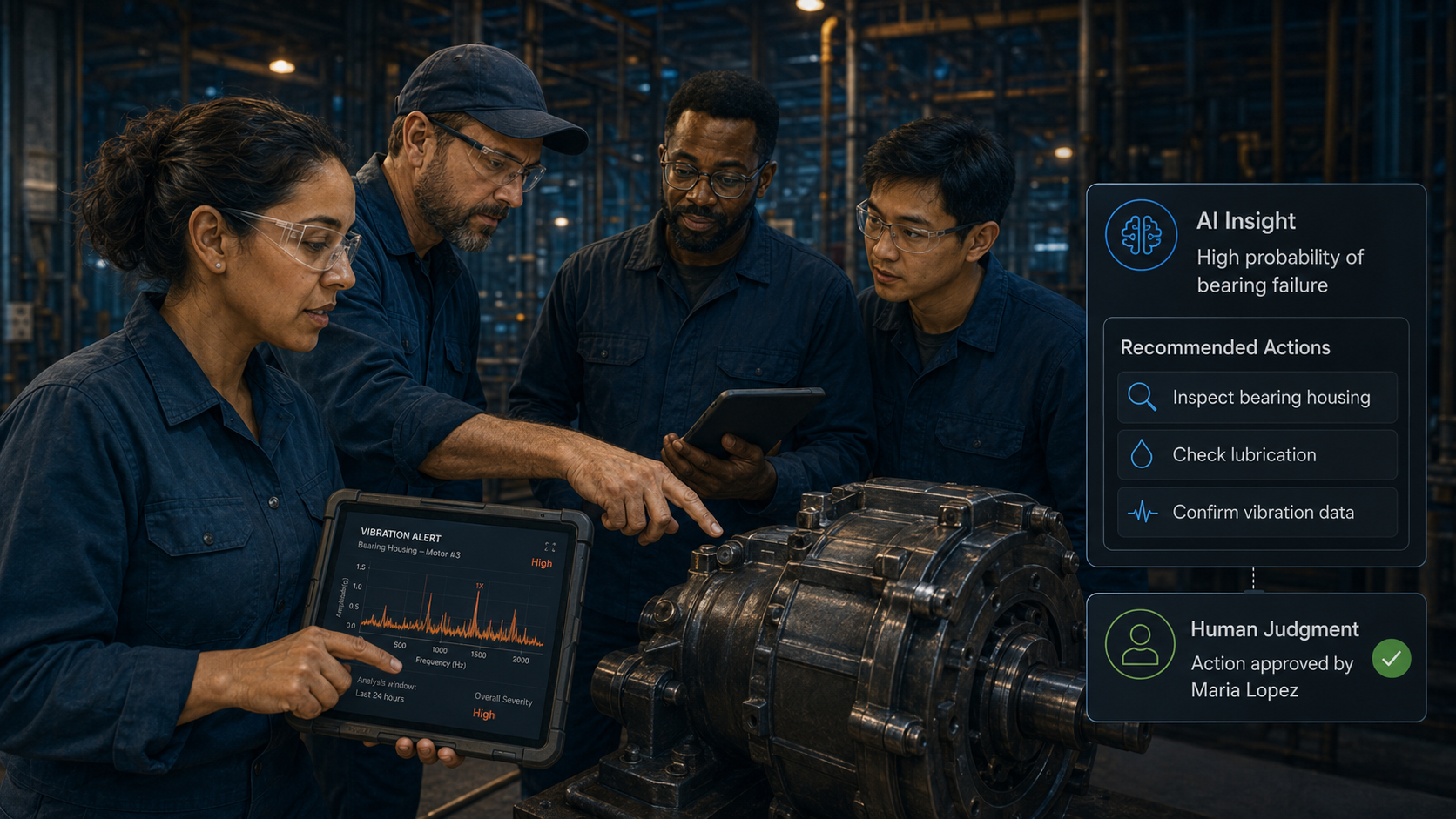
Atlas introduces predictive-maintenance technology. An alert may identify something worth investigating, but the team still needs to establish who reviews it, what evidence matters, and who is accountable for the response.
The maintenance technology supplies the alert. TalentSync’s role in this scenario is the human context around responsibilities, capabilities, and follow-through.
Pythia could help surface the new questions. The shared team and workflow views could make responsibilities and support needs easier to examine. What the team learns from each response can inform the next review.
The same approach applies when new equipment, growth, or changing customer demands reshape the work.
05 · RETURN VALUE TO THE PEOPLE
Suppose a colleague spots an issue, coordinates the right people, and documents what the team learns. That contribution should remain visible after the work order closes.
The concept connects a contribution with supporting evidence, recognition, and development opportunities.
Passport Pages provide the intended exchange framework: request relevant context, return useful recognition or resources, and distinguish organizational records from person-controlled TalentPass information.
Employees should be able to review interpretations, add missing context, acknowledge collaborators, and understand what is shared. The organization gains a clearer picture; people gain something useful from participating.
For Atlas, the immediate goal is a more dependable way to coordinate work and share knowledge. The team would need to test whether its changes actually help.
Does the next shift receive the context it needs?
Can more people contribute with appropriate support?
Do contributions and outcomes improve the next decision?
These are outcomes to work toward and evaluate—not results achieved by a customer in this fictional example.
Start with the part of the Atlas story that feels familiar. A focused workshop can help your team investigate the problem and agree on practical next steps before deciding whether ongoing software would be useful.
Explore responsibility, decision rights, and expectations.
Explore handoffs, coordination, and cross-functional accountability.
Explore how AI affects work, responsibilities, and support needs.
These are alternative starting points. Gobekli helps identify the appropriate workshop foundation and connected modules for one defined challenge.
Bring together the people closest to the work. Identify the decision that matters. Use the evidence to decide what should change—and what is worth maintaining afterward.
A scoped TalentSync setup can be an optional continuation when ongoing visibility would help. Its scope depends on the findings, participants, and available capabilities.

This website uses cookies. Essential cookies are required for the site to function properly. With your consent, we may also use functional, analytics and marketing cookies. Click "Settings" to choose categories, or "Accept All" to consent to all cookies. You can change your preferences at any time.
Cookies are small text files stored on your device.
You can change your preferences at any time by clicking the cookies icon.